한국 서버를 위한 파티 찾기 애드온
WOW Forever - KR Server Party Finder
[Summary]
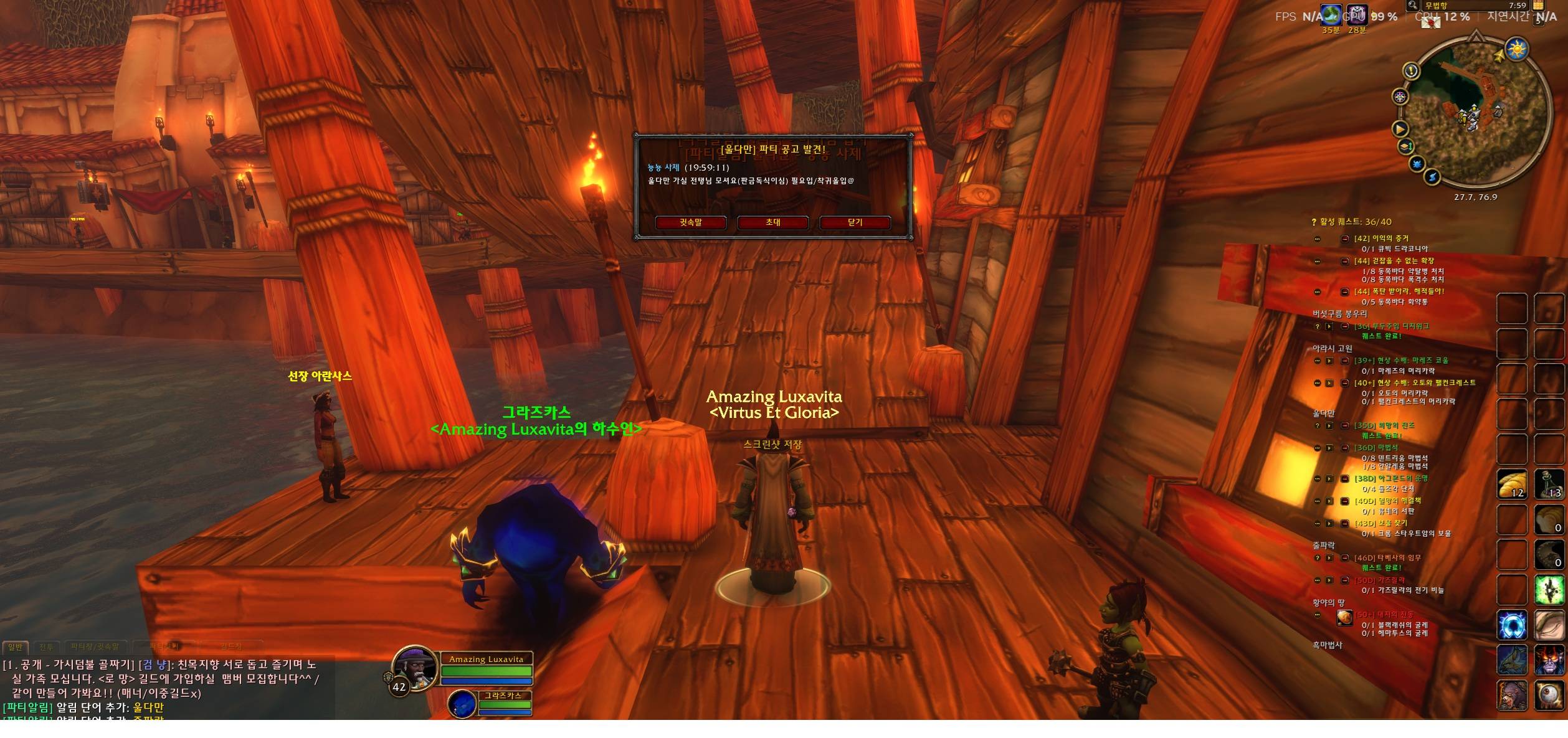
EN: Get a pop-up alert when a party listing with your dungeon keywords is posted in the LFG chat channel.
KR: 파티찾기 채널에 원하는 던전명이 포함된 파티 공고가 올라오면 팝업으로 알려줍니다.
[Description]
PartyAlert
Never miss a group for the dungeon you want. 원하는 던전의 파티 공고를 놓치지 마세요.
🇺🇸 English
What is it?
Scrolling through a busy LFG channel waiting for the right group is tiring. PartyAlert watches the Looking-for-Group chat channel for you. When someone posts a message that contains one of your keywords (dungeon names, abbreviations, etc.), it alerts you right away, even while you are questing, in combat, or tabbed out.
Features
- Keyword alerts: register as many words as you like (e.g.
BRD, MC, ZG) - Pop-up window showing the sender and the full message, with Whisper and Invite buttons
- Alert sound, center-screen warning text and taskbar icon flash when the game is minimized (each can be turned on/off)
- Ignore words: skip messages that contain words like
LFG or LF1M if you only want certain posts - Spam protection: the same player posting the same keyword won't alert you again for 60 seconds (adjustable)
- Alert history: review the last 10 alerts
- In-game help window (
/pa help) with current settings and a test button - Lightweight, no library dependencies, settings saved account-wide
Getting started
- Join the LFG channel (on Korean clients:
/join 파티찾기) - If your channel has a different name, set it:
/pa channel LookingForGroup - Add keywords:
/pa add BRD, MC, ZG - Preview the alert:
/pa test
That's it. You'll be notified whenever a matching post appears.
Commands
| Command | Description |
|---|
/pa help | Open the in-game help window |
/pa add word1, word2 | Add alert keywords (comma separated) |
/pa del word | Remove a keyword |
/pa clear | Remove all keywords |
/pa list | Show current settings |
/pa ignore word / /pa unignore word | Add / remove ignore words |
/pa channel name | Change the watched channel (default: 파티찾기) |
/pa on / /pa off | Enable / disable alerts |
/pa sound / flash / warn | Toggle sound / taskbar flash / center-screen text |
/pa cd 60 | Re-alert cooldown for the same player + keyword (seconds) |
/pa history | Show the last 10 alerts |
/pa test | Show a test pop-up |
/pa reset | Reset the pop-up position |
Aliases: /pa, /partyalert, /파티알림
Tips
- Matching is "contains":
Molten also matches Molten Core. - Register common abbreviations too (
MC, BRD, ZG, ...). - Drag the pop-up to move it; press ESC to close it.
- Your own messages never trigger alerts.
Feedback
Found a bug or have an idea? Please leave a comment or open an issue. Lua error text or screenshots are very helpful.
🇰🇷 한국어
어떤 애드온인가요?
원하는 던전 파티를 찾으려고 파티찾기 채널을 계속 지켜보기는 번거롭습니다. PartyAlert는 파티찾기 채널을 대신 지켜보다가, 내가 등록한 단어(던전명, 줄임말 등)가 들어간 글이 올라오면 바로 알려줍니다. 퀘스트나 전투 중이어도, 게임 창을 내려놓았어도 알림을 받을 수 있습니다.
주요 기능
- 키워드 알림: 단어를 원하는 만큼 등록 (예:
검은바위, 화심, 줄구룹) - 팝업 창: 보낸 사람과 글 전체를 보여주고, 귓속말 / 초대 버튼으로 바로 연락
- 경고 소리, 화면 중앙 경고 문구, 게임 창을 내려놨을 때 작업표시줄 아이콘 깜빡임 (각각 켜고 끌 수 있음)
- 제외 단어:
구직처럼 원하지 않는 글은 무시 - 도배 방지: 같은 사람이 같은 단어로 다시 올리면 60초 동안 재알림 안 함 (시간 조절 가능)
- 알림 기록: 최근 알림 10개 다시 보기
- 인게임 사용법 창 (
/pa help): 현재 설정 확인, 테스트 버튼 제공 - 가볍고 다른 라이브러리가 필요 없으며, 설정은 계정 전체에 저장
시작하기
- 파티찾기 채널에 입장:
/입장 파티찾기 - 알림 받을 단어 등록:
/pa add 검은바위, 화심, 줄구룹 - 알림 미리보기:
/pa test
이제 해당 단어가 들어간 공고가 올라오면 바로 알려줍니다.
명령어
| 명령어 | 설명 |
|---|
/pa help | 인게임 사용법 창 열기 |
/pa add 단어1, 단어2 | 알림 단어 추가 (쉼표로 여러 개) |
/pa del 단어 | 알림 단어 삭제 |
/pa clear | 알림 단어 전체 삭제 |
/pa list | 현재 설정 보기 |
/pa ignore 단어 / /pa unignore 단어 | 제외 단어 추가 / 삭제 |
/pa channel 이름 | 감시할 채널 변경 (기본: 파티찾기) |
/pa on / /pa off | 알림 켜기 / 끄기 |
/pa sound / flash / warn | 소리 / 작업표시줄 깜빡임 / 중앙 문구 켜기·끄기 |
/pa cd 60 | 같은 사람+같은 단어 재알림 대기 시간(초) |
/pa history | 최근 알림 10개 보기 |
/pa test | 테스트 팝업 띄우기 |
/pa reset | 팝업 위치 초기화 |
같은 명령어: /pa, /partyalert, /파티알림
팁
- 단어는 포함 기준으로 찾습니다.
화산으로 등록하면 화산심장부도 걸립니다. - 줄임말(
화심, 검바위, 줄구룹 등)도 함께 등록하면 놓치지 않습니다. - 팝업은 드래그로 옮길 수 있고 ESC로 닫힙니다.
- 내가 쓴 글에는 알림이 뜨지 않습니다.
문의 / 버그 제보
버그나 원하는 기능이 있으면 댓글로 남겨 주세요. Lua 오류 내용이나 스크린샷을 함께 주시면 빨리 고칠 수 있습니다.

 LuxaVita
 LuxaVita